Google Shopping
Merchant Center disapprovals and suspensions: what they mean and how to fix them
A disapproved product loses its ads. A suspended account loses all of them. Most problems come from a short list of causes, and nearly all of them are fixable. Here's how to read what Merchant Center is telling you, and what to do about it.
 Matthew DaviesCo-Founder, Growtomic
· 4 min read
The short version
- Product-level disapprovals affect individual items. Account-level suspensions stop everything.
- Price and availability mismatches are the most common product issues, and structured data on your pages prevents most of them.
- Misrepresentation suspensions are usually about trust signals: contact details, policies and honest pricing.
- Fix everything before you request a review. Failed reviews can lock you out of asking again for a while.
Two kinds of problem
Merchant Center flags issues at two levels, and they need different responses:
| Level | What it affects | Where to look |
|---|---|---|
| Product | Individual products stop showing in ads or free listings | Products > Needs attention, and the diagnostics for each item |
| Account | Every product stops showing. This is a suspension or warning | The account issues banner and Business information |
Always check whether an issue is a warning or a disapproval. Warnings limit performance but don't stop products serving. Disapprovals and suspensions do.
The most common product issues
| Issue | Usual cause | Fix |
|---|---|---|
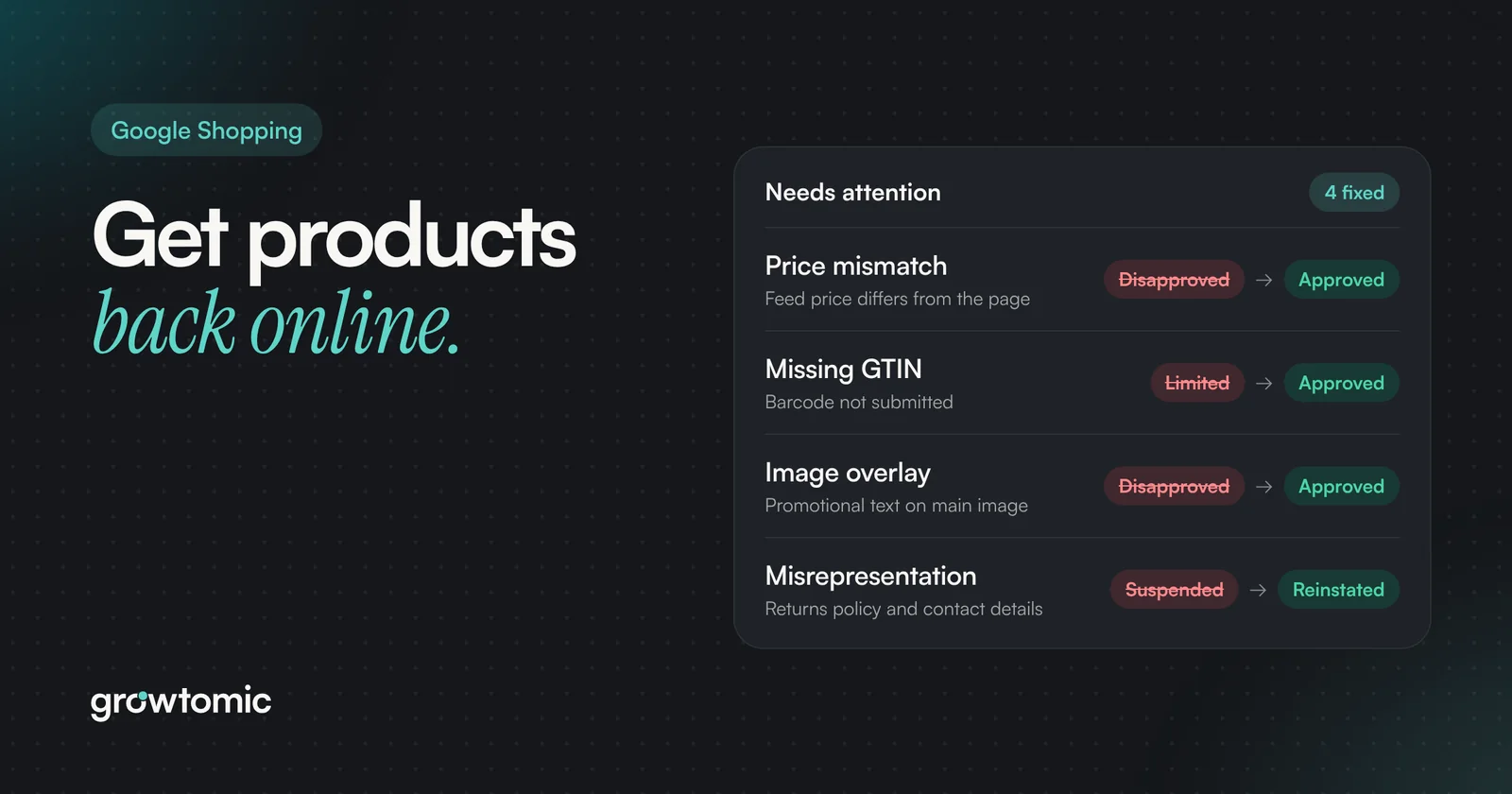
| Price mismatch | Feed price differs from the page, often after a sale ends or because VAT is excluded | Sync the feed more often, include VAT in UK prices, add Product structured data |
| Availability mismatch | Product shows in stock in the feed but out of stock on the site, or the reverse | Same as price: frequent syncs and structured data |
| Missing or incorrect GTIN | Barcode missing, made up, or attached to the wrong variant | Use manufacturer EANs. Set identifier_exists to no only for products without one |
| Image issue | Promotional text or watermark, placeholder image, or too small | Clean main image on a plain background, at least the minimum size |
| Landing page not working | Page returns an error, redirects to the homepage, or blocks Google's crawlers | Fix the URL, and check robots.txt allows Googlebot and Storebot-Google |
| Restricted or prohibited product | Products like alcohol, weapons, some health products and supplements fall under specific policies | Check the Shopping ads policy for the category. Some products need certification or can't be advertised |
Misrepresentation: the suspension everyone fears
Misrepresentation is the most common account suspension, and the most frustrating, because Google says very little about what triggered it. In practice it's almost always about whether a shopper would trust your site. Go through the site as if you were a cautious first-time customer.
- Contact details. A real address, phone number or email, and a contact page that's easy to find.
- Returns and refunds. A clear policy with the return window, who pays return postage and how refunds work.
- Delivery. Costs and times shown before checkout, matching what's in Merchant Center.
- Payment. Accepted payment methods shown, a working checkout, and HTTPS across the site.
- Honest pricing and offers. No permanent "sale" prices, fake countdown timers or discounts from prices you never charged.
- About the business. Who runs the shop, and for UK limited companies, the company name and registration number.
- Your own content. Product descriptions and images that aren't copied from other sites, and no broken pages or placeholder text.
- Reviews and claims. No reviews you can't stand behind, and no claims about products you can't support.
New stores get flagged more often, because they have no history. A thin site with no policies, a generic template and very low prices looks exactly like the scam shops Google is trying to keep out.
Requesting a review
- Fix everything on the list above, not just the thing you think caused it.
- Make sure the fixes are live on the site, not just saved in a draft.
- Check that Business information in Merchant Center matches what's on the site.
- Then request a review from the issue in Merchant Center.
Don't request a review straight away hoping it was a mistake. If a review fails, Google can make you wait before you can ask again, and repeated failures make it slower. One thorough review request beats three quick ones.
Other account issues
| Issue | What it usually means |
|---|---|
| Website needs improvement | Google thinks the site is incomplete or hard to use: broken links, missing pages, placeholder content |
| Unsupported shopping content | Some products in the feed aren't allowed in Shopping, such as services or digital subscriptions |
| Policy violation for a product category | A product breaks a specific policy, such as dangerous products or unapproved pharmaceuticals |
| Website not verified or claimed | The site isn't verified and claimed in Merchant Center, often after a domain or account change |
Preventing it happening again
- Add Product structured data to every product page, including price, currency and availability.
- Sync your feed at least daily, and more often during sales.
- Turn on automatic item updates.
- Check the Needs attention list weekly, not when sales drop.
- Before any big site change (a new theme, new domain or new checkout), check that policies, contact details and structured data survive it.
If you're moving to a CSS, the new Merchant Center account goes through these checks from scratch, so fix these issues first. See how to switch to a CSS.
Questions
How long does a Merchant Center review take?
Product reviews are often done within a few days. Account reviews can take longer. Merchant Center shows the review status on the issue itself.
Does a suspension affect my Google Ads account?
It stops Shopping ads and free listings from that Merchant Center account. Search text ads in Google Ads can keep running, unless there's also a separate Google Ads policy issue.
Should I open a new Merchant Center account to get round a suspension?
No. Google treats that as circumventing its systems, which can lead to the new account and related accounts being suspended too. Fix the cause and request a review.
Written by
Matthew DaviesMatthew is co-founder of Growtomic and an ecommerce conversion specialist. He runs Google Shopping, CSS and PPC accounts for our clients and for ecommerce stores of his own.
LinkedInShopping and Performance Max that pay back. Start with a free audit.